Quick answer
To connect Instagram to Hyvo, open Connect in the left sidebar, click Connect account and pick the Instagram card. Approve access on Instagram's own sign-in screen, then choose the account in Hyvo's "Choose a Instagram account" window and click Connect. Only Instagram Business and Creator accounts can be connected, and every post you send to Instagram needs an image or a video.
Key takeaways
- Instagram connects from Connect, then Connect account, then the Instagram card.
- Only Business and Creator accounts can be connected; switch a personal account to professional first.
- Nothing is connected until you pick the account and click Connect in Hyvo.
- Each Instagram post from Hyvo carries one image or one video, and text-only posts are refused.
Connecting Instagram to Hyvo takes about a minute: open Connect, click Connect account, choose Instagram, approve access on Instagram's screen, then confirm the account in Hyvo. Hyvo is an AI social media management tool, so once Instagram is connected it sits in the same composer, calendar and inbox as the rest of your networks.
This guide covers the connection itself, the account types Instagram accepts, and what changes about posting once the account is in Hyvo.
Which Instagram accounts can you connect to Hyvo?
Hyvo connects Instagram Business and Creator accounts. Personal accounts can't be connected, because Instagram only lets professional accounts publish through outside apps. The Instagram card in Hyvo spells this out, so you'll see the rule before you start. If your account is personal, switch it to a professional account in the Instagram app's settings. It costs nothing and takes a minute.
You also need to be an Owner or Admin in your Hyvo workspace. Members don't see Connect in the sidebar.
How do you connect Instagram to Hyvo, step by step?
You connect Instagram from the Connect page, in five short steps: open Connect, click Connect account, pick the Instagram card, approve access on Instagram, then confirm the account back in Hyvo. Connect lives at the bottom of the left sidebar, under Settings, and shows every network with the number of accounts already connected on each.
- Click Connect in the sidebar.
- Click Connect account in the top-right corner of the page.
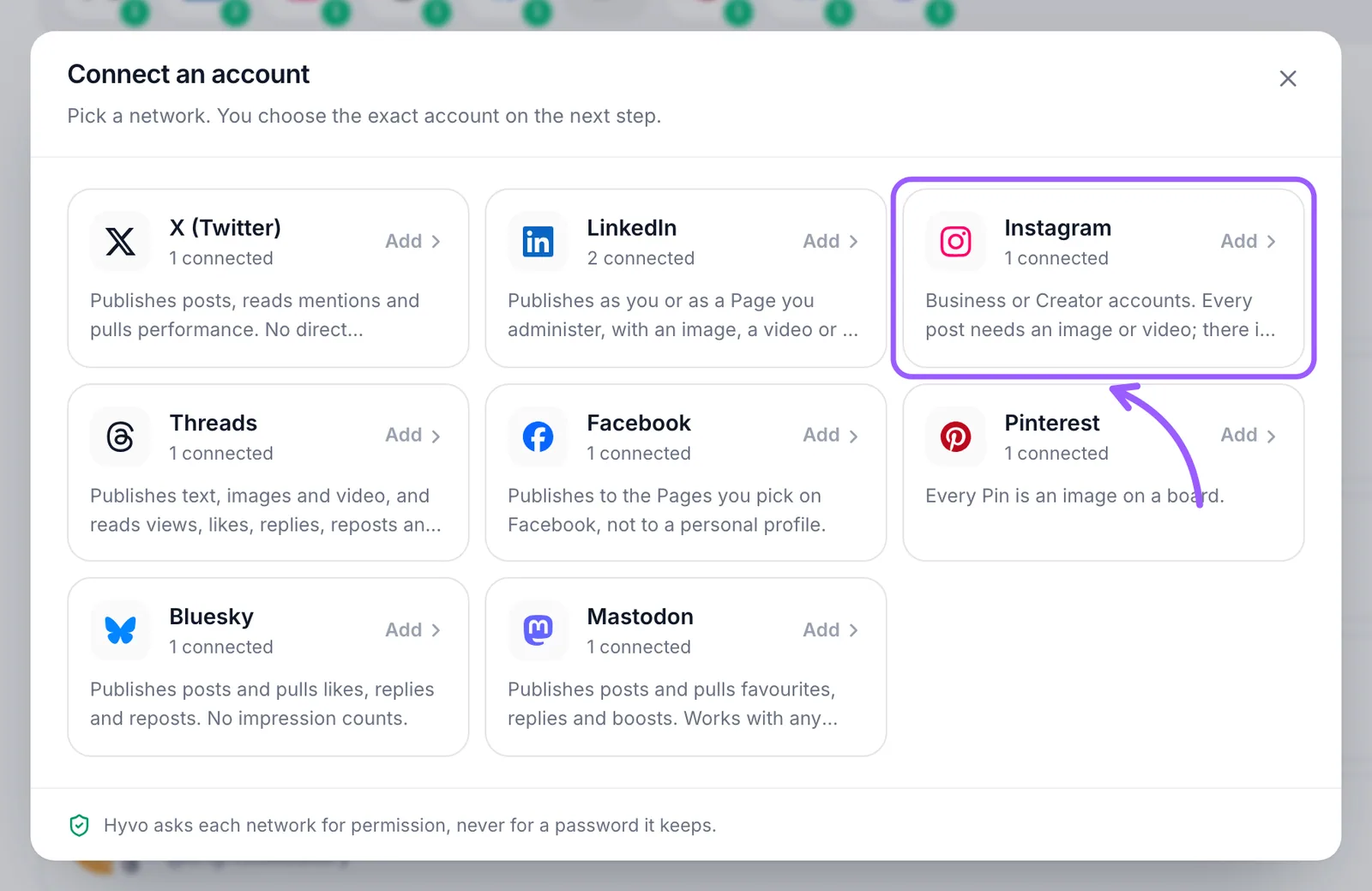
- In the "Connect an account" window, click the Instagram card.
- Sign in on Instagram's screen and approve the access Hyvo asks for.
- Back in Hyvo, select the account and click Connect.
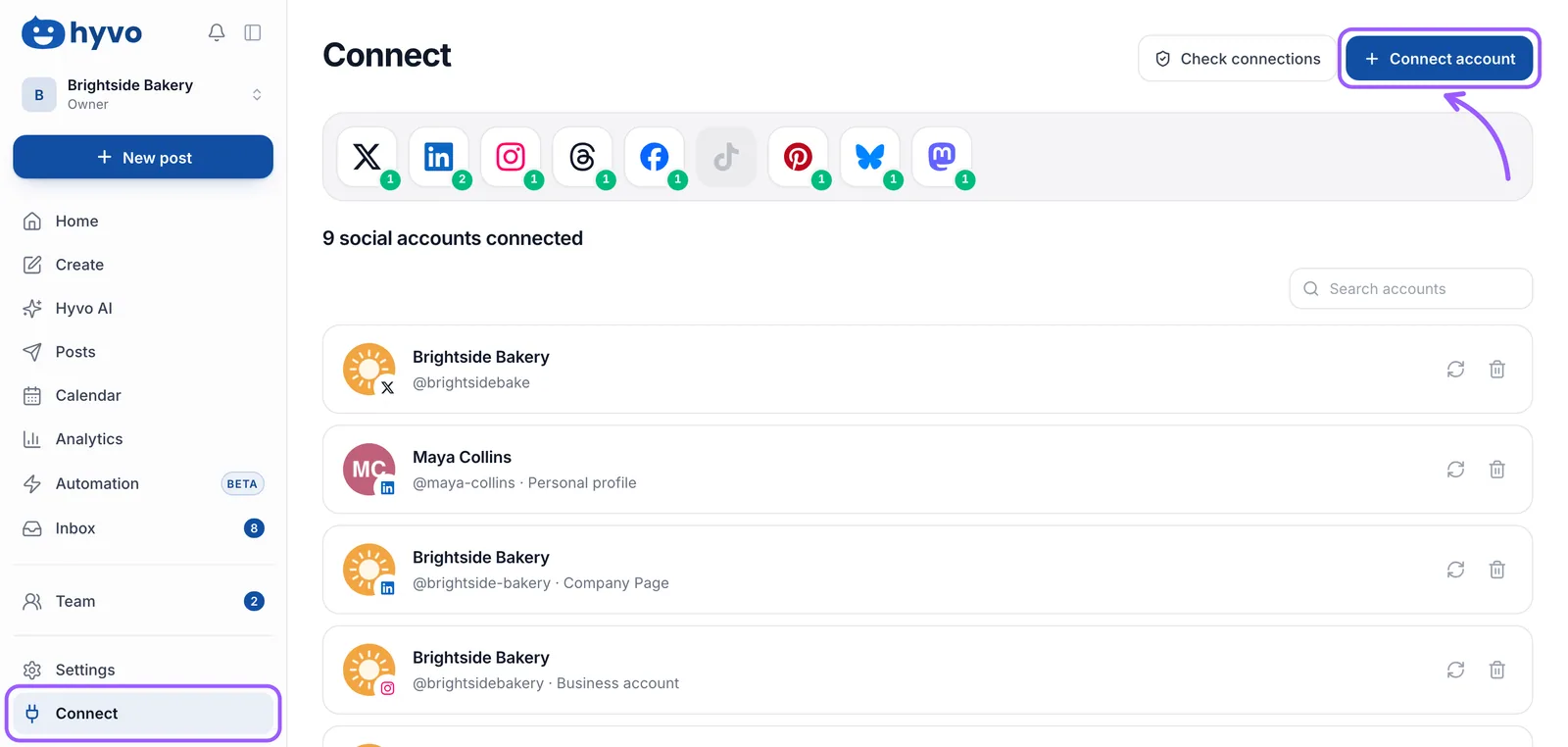
The window lists the networks you can add and how many accounts you already have on each. Under each name, a short line says what Hyvo does there. For Instagram it reads "Business or Creator accounts. Every post needs an image or video; there is no text-only post."
What happens after you approve access on Instagram?
Instagram sends you back to Hyvo, where a window titled "Choose a Instagram account" asks you to confirm the account Hyvo should publish to. It shows the account's name, handle, account type and follower count. Select it and click Connect. Until you do, nothing is added: the window says "Nothing is connected until you choose," so closing it is a clean way out.
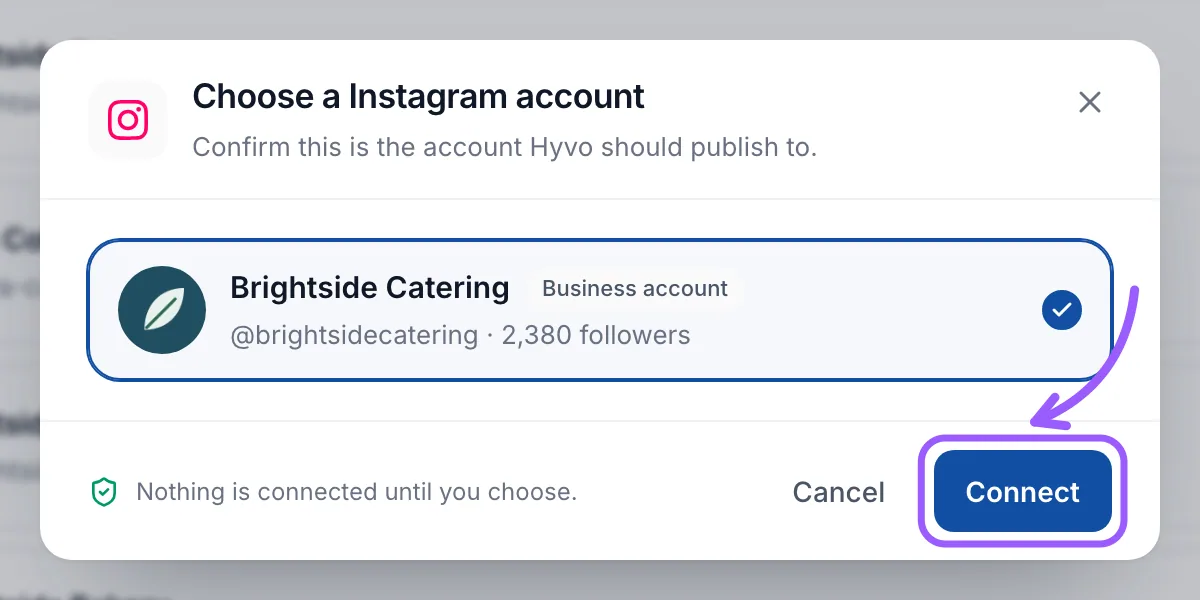
If the list is empty, Instagram didn't hand over a professional account. Check the account type first, then try again.
What changes about posting once Instagram is connected?
Instagram has stricter rules than most networks, and Hyvo applies them in the composer before anything goes out. The main one: every post needs media. Select Instagram without an attachment and the bottom of the composer says Instagram needs an image or video, and the post waits until you add one.
| Instagram rule in Hyvo | What it means for you |
|---|---|
| Up to 2,200 characters | Long captions fit, but the first line does the work in the feed. |
| One image or one video per post | Carousels aren't sent from Hyvo; post those in the Instagram app. |
| Media is required | Add a photo, a video, a Canva design or an Unsplash photo. |
| Videos publish as Reels | Plan vertical video for anything you want to perform. |
You can write one caption for every network and then adjust the Instagram version on its own tab, so hashtags and line breaks stay on Instagram. The Create features page shows the composer, AI Assist and the Canva import in more detail.
Where do Instagram comments and messages show up?
Comments on your posts and Instagram Direct messages come into Hyvo's Inbox, next to Facebook, X, Threads, Bluesky and Mastodon. Messages depend on the permission Instagram granted, and Instagram only lets businesses reply to a message within 24 hours of the person's last one. After that window, reply in the Instagram app. The Inbox features page covers how conversations are grouped.
What if the Instagram connection stops working later?
Instagram permissions can lapse, for example after a password change. When that happens the account turns amber on the Connect page with a Reconnect button, and Hyvo can send you an "Accounts to reconnect" notification. Reconnecting runs the same sign-in and refreshes the permission without losing your posts or history.
If you manage a Facebook Page too, the Facebook connection guide walks through the Page picker, which works the same way. Each Instagram account counts as one social account on your plan, and the pricing page lists how many each plan includes.
Frequently asked questions
Can I connect a personal Instagram account to Hyvo?
No. Instagram only lets Business and Creator accounts publish through connected apps, and the Instagram card in Hyvo says so. Switching a personal account to a professional one is free in the Instagram app's settings. Once switched, connect it the normal way.
Does Hyvo keep my Instagram password?
No. You sign in on Instagram's own screen and approve access there. The Connect window in Hyvo states that it asks each network for permission, never for a password it keeps.
Can Hyvo post a text-only update to Instagram?
No. Instagram has no text-only post. If Instagram is selected and nothing is attached, the composer shows a hint that Instagram needs an image or video and holds the post until you add one.
Can I post an Instagram carousel from Hyvo?
Not at the moment. Hyvo sends one image or one video per Instagram post. If a carousel matters for a particular post, publish that one in the Instagram app and schedule the rest in Hyvo.

Written by
Hyvo Editorial Team
Editorial team
The Hyvo Editorial Team shares practical tips, strategies, and insights on social media marketing, content creation, and digital marketing.