Quick answer
To connect Bluesky to Hyvo, create an app password in Bluesky's settings first. Then click Connect in Hyvo's sidebar, click Connect account, choose Bluesky, and enter your handle and the app password. Confirm the account and click Connect. Never use your main Bluesky password: the Connect Bluesky window says "Not your account password" under the field for exactly that reason.
Key takeaways
- Bluesky connects with a handle and an app password, not a sign-in page.
- Create the app password in Bluesky's settings; it can be revoked at any time.
- Self-hosted accounts use the "I host my own server" option.
- Bluesky posts in Hyvo hold 300 characters and up to four images; Bluesky shares no impression counts.
To connect Bluesky to Hyvo, create an app password in Bluesky, then open Connect, click Connect account, pick Bluesky, and enter your handle and that app password. Hyvo is an AI social media management tool, and Bluesky is the one network it connects without a sign-in screen, which is why the app password matters.
Why does Bluesky use an app password instead of a sign-in screen?
Bluesky lets outside apps connect with app passwords: separate passwords that work for one app and can be revoked on their own. Hyvo uses one so it can publish and read your posts without ever holding your real Bluesky password. If you stop using Hyvo, or just want to cut it off, you delete that one app password in Bluesky and nothing else changes.
How do you create a Bluesky app password?
Create the app password in the Bluesky app before you open Hyvo. It takes under a minute: open Bluesky's settings, go to the privacy and security area, find App passwords and add a new one with a name you'll recognise, such as "Hyvo". Bluesky shows the password once in the format xxxx-xxxx-xxxx-xxxx, so copy it straight away.
The Connect Bluesky window in Hyvo also has a Create one in Bluesky link under the password field if you'd rather start there.
How do you connect Bluesky to Hyvo?
You connect Bluesky from the Connect page, like any other network, and it needs only your handle and the app password you just made. The window explains itself in one line: "Sign in with an app password so Hyvo can publish and read this account's posts."
- Click Connect in the sidebar, then Connect account.
- Click the Bluesky card.
- Enter your Handle, for example yourname.bsky.social.
- Paste the App password and click Connect.
- Confirm the account in "Choose a Bluesky account" and click Connect.
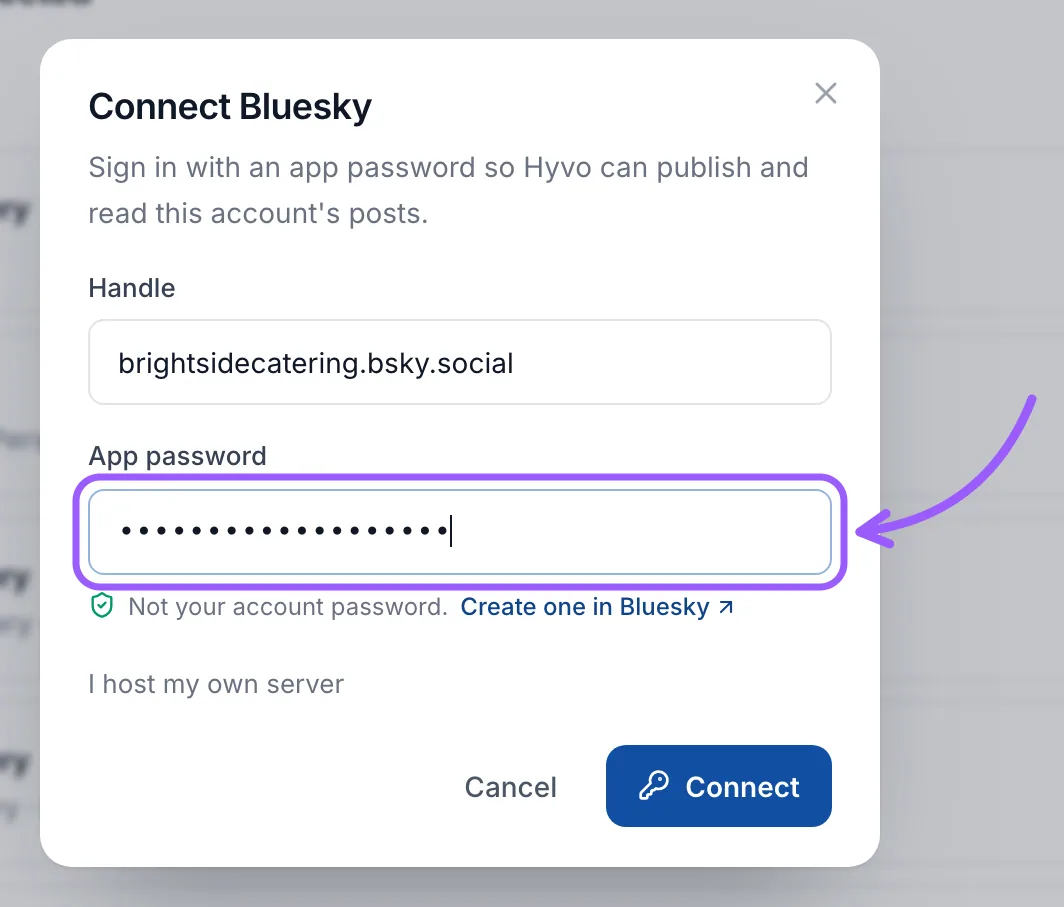
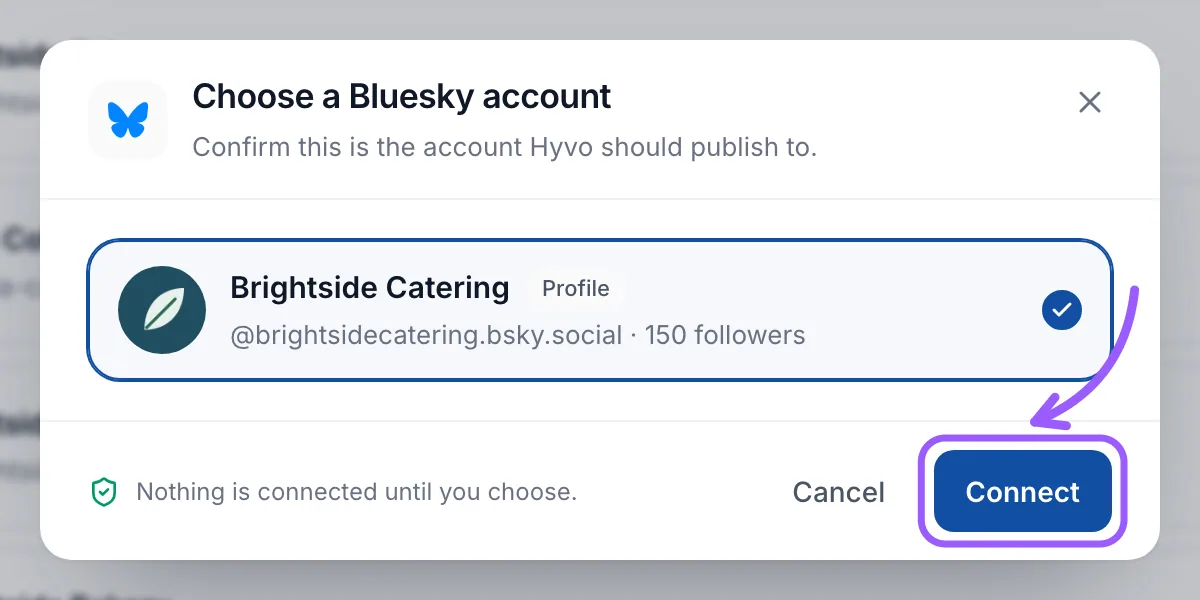
If you run your own Bluesky server, click I host my own server and enter its address before connecting.
What can Hyvo post to Bluesky?
Bluesky posts from Hyvo can be 300 characters long with up to four images. Bluesky counts characters the way people see them, so an emoji counts as one, and the composer's counter on the Bluesky tab follows the same rule. Bluesky has the shortest limit of the networks Hyvo supports, so if Bluesky is selected, the All channels counter shows 300 as the ceiling until you tailor the Bluesky version.
| Detail | Bluesky in Hyvo |
|---|---|
| Post length | 300 characters |
| Media per post | Up to 4 images |
| Numbers Hyvo reads | Likes, replies, reposts, quotes |
| Impressions | Not shared by Bluesky |
| Inbox | Replies, mentions and quotes |
What happens if you revoke the app password?
Hyvo loses access right away. The account turns amber on the Connect page with a Reconnect button, and posts to it wait until you fix it. Reconnecting Bluesky opens a small window that asks for a fresh app password, so create a new one in Bluesky first, then paste it in.
Mastodon is the other decentralised network Hyvo supports, and it connects through your own server's sign-in. If you're setting up several accounts at once, the X guide explains the one network that needs a paid plan, and the pricing page shows how many accounts each plan includes. For how replies from Bluesky are handled, see the Inbox features.
Frequently asked questions
What is a Bluesky app password?
A separate password Bluesky generates for one app. It lets that app post and read on your behalf without knowing your real password, and you can revoke it in Bluesky's settings without affecting anything else.
Can I use my normal Bluesky password in Hyvo?
Don't. The field is labelled App password, and the hint underneath reads "Not your account password." Create an app password in Bluesky and use that, so you can cut Hyvo off later without changing your main password.
Why doesn't Hyvo show impressions for Bluesky posts?
Bluesky doesn't share impression counts with apps. Hyvo shows likes, replies, reposts and quotes instead, which are the numbers Bluesky makes available.
Does Bluesky work with a self-hosted server?
Yes. Choose "I host my own server" in the Connect Bluesky window and enter your server's address along with your handle and app password.

Written by
Hyvo Editorial Team
Editorial team
The Hyvo Editorial Team shares practical tips, strategies, and insights on social media marketing, content creation, and digital marketing.