How Hyvo AI Works
Chat and Agent, what each one's good at, what Hyvo AI can actually see when it answers you, and where the line between the plans sits.

Quick guide
Hyvo AI has two modes sharing one conversation. Chat answers a question right away. Agent plans a job, runs its own tools, and comes back with the finished thing.
- Ask in Chat when you want an answer: a draft, an idea, a read on your numbers.
- Switch to Agent when you want an outcome: a report, a campaign plan, a week of posts.
- Both read your workspace (posts, calendar, drafts, inbox, analytics) so answers are about your account, not social media in general.
- Both use your brand memory, so drafts start in your voice.
- Chat is on every plan. Agent, research and the deeper analysis come with Premium.
The full walkthrough is below.
"AI assistant" covers an enormous range of things, from a text box that rewrites a sentence to something that disappears for a minute and comes back with a report. Hyvo has both, and we kept them as two modes rather than two products on purpose.
Here's what each one does, what Hyvo AI can actually see when it answers, and which one you want for a given job.
Two modes, one conversation
The mode switch sits inside the composer, right next to where you type. That's because it's a property of the message you're about to send, not a setting you go somewhere to change.

They share one thread. Ask a question in Chat, get an answer, then flip to Agent and tell it to go do the thing you just talked about. Nothing gets lost in between.
Chat: a question, answered
Chat is a conversation. Your question goes to the model, the answer comes back, nothing in between. It's the default because most of what anybody types is a question, and making a question wait on a planner and four analytics reads is a bad trade.
What it's good at:
- Drafting or rewriting a post.
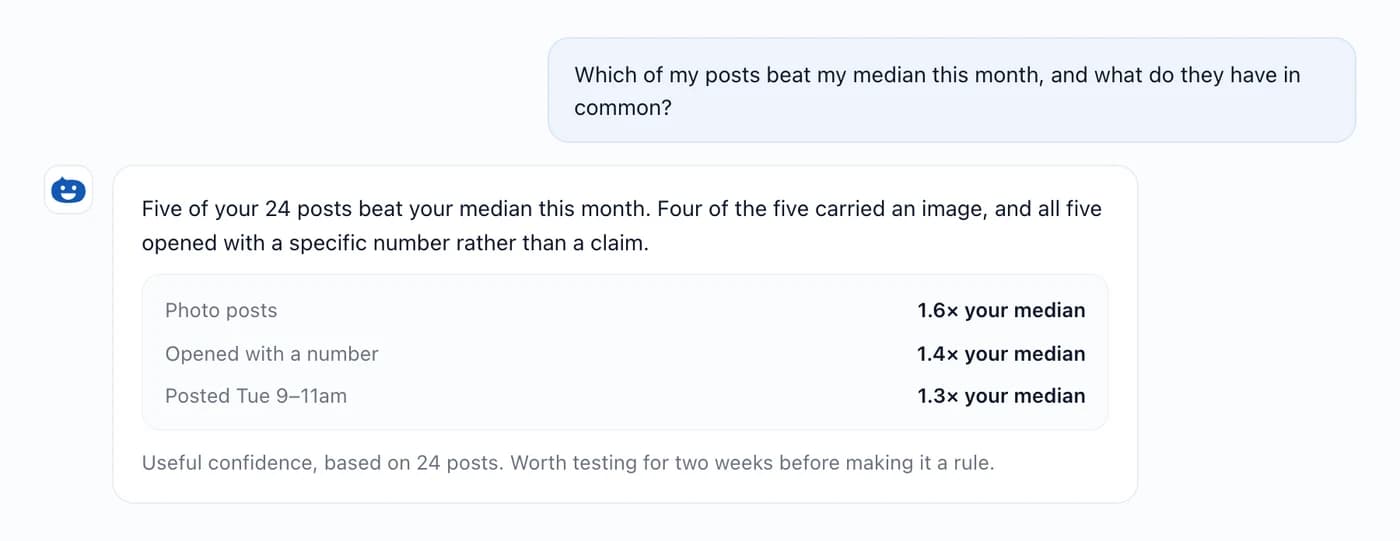
- Reading your numbers and answering "how am I doing?" against your own baseline.
- Telling you what's on the calendar, what's in drafts, what's waiting in the inbox.
- Kicking ideas around: angles, openings, what to write about.
Agent: a job, done
Agent is the work. You describe what you want at the end; Hyvo plans it, runs its own tools over several rounds, and brings back the finished thing. The steps are our problem, not yours.
What it's for:
- A full performance report: the numbers, what changed, what's behind it, what to do next.
- A content plan for the next fortnight, with the posts drafted.
- A campaign planned end to end: the angle, the sequence, the timing, what to measure.
- Researching a competitor or a market and coming back with what actually matters for you.
One line to remember: "what should I post this week?" is Chat. "Write next week's posts" is Agent.
What Hyvo AI can actually see
This is the part that decides whether an AI assistant is useful or just decorative. Hyvo AI isn't answering from general knowledge about social media. It reads your workspace through its own tools:
- Your posts, published and scheduled, with the numbers each one picked up.
- Your analytics, including your own medians, so "good" means good for you.
- Your calendar and drafts, so "what's coming up" and "find my gaps" are real answers.
- Your inbox, so it can tell you what's genuinely waiting for a reply.
- Your brand memory, so drafts start in your voice rather than a generic one.
It also knows which screen you asked from. Ask something on the analytics page with a date range selected and it gets answered for that range without you restating it. That context decides which question is worth asking; the server works out what you're allowed to read from your session either way.
Finding out what it can do
The landing screen deliberately shows a question box instead of a menu. The full range lives behind the + inside the composer, grouped by what you're trying to do: Create, Analyse, Your workspace, Plan, Research.
Two rules govern that menu, and they're worth knowing because they change how much you can trust it:
- Every item maps to something Hyvo genuinely answers with a tool. Nothing in there comes back with "Hyvo doesn't have that yet".
- Items your plan doesn't include are missing entirely rather than greyed out. A free workspace gets a shorter list that's complete, not a longer one full of locks.
Where the plan line falls
| Capability | Free | Premium |
|---|---|---|
| Chat | Yes | Yes |
| Agent mode | No | Yes |
| AI requests | 30 a month | Unlimited |
| Reading your posts, calendar, drafts and inbox | Yes | Yes |
| Headline analytics | Yes, 7 and 30 days | Yes, up to a year |
| What works, best time, audience analysis | No | Yes |
| Market, trend and competitor research | No | Yes |
Roughly: free reads your own numbers, Premium gets the interpretation of them and the research beyond them.
Getting better answers out of it
- Say what you want back. "Three post ideas" gets you something more usable than "help me with content".
- Ask from the screen the question's about. It picks up whatever you're looking at.
- Keep brand memory current. Everything it writes starts there: see creating a consistent brand voice.
- Use Agent for jobs, not questions. Asking Agent a one-line question is slower than Chat for the same answer.
What it can't do
- AI output can be wrong or incomplete. Read anything before it publishes.
- Patterns come with a sample size for a reason. A finding from 20 posts is a direction to test, not a fact.
- It reports what the networks actually returned. Where a platform publishes no impression count, there's no impression figure to analyse.
FAQs
Do I have to pick a mode before I start?
No. Chat's the default, and you can switch to Agent halfway through without losing the thread.
Does Hyvo AI post anything without me?
Not on its own. Publishing happens when you publish, or when an automation you built runs, and automations can be set to hold for your approval first.
Is my content used to train models?
No. Context gets sent to model providers acting as processors so they can generate what you asked for. Your content isn't used to train foundation models for other customers.
What counts as an AI request on the free plan?
One turn you send to Hyvo AI. Thirty a month on free; Premium is unlimited.
Can Hyvo AI look at my competitors' accounts?
Market, trend and competitor research comes with Premium. On free, those items aren't in the menu at all.
About the author

Founder, Hyvo
Subarna Basnet is the founder of Hyvo, an AI-powered platform helping businesses create, manage, and automate social media marketing. He writes about AI, social media automation, content creation, and marketing technology.