How to Automate Content Workflows
What a Hyvo automation is made of, how to describe one in plain English, and which parts of a content workflow are worth automating at all.

Quick guide
Describe the workflow in a sentence, check what Hyvo understood, and put an approval step before anything publishes. Automate the boring half; keep the judgement manual.
- Automate a task you already do the same way every time. Automating a decision just produces bad decisions faster.
- Describe it in one sentence: when it starts, what happens, what you want at the end.
- Read the workflow Hyvo built before you create it. The steps are shown before anything runs.
- Put Ask me first before any publishing step until you trust what it produces.
- Watch the first few runs. The statuses tell you which step stopped and why.
The full walkthrough is below.
Automation gets oversold in social media, usually as "post while you sleep". The version that's actually worth having is narrower and duller: the parts of your week that are identical every time, done without you.
We're fairly cautious about this one, which is why Hyvo has an approval step at all. Plenty of tools will happily publish whatever a model produced at 3am. That's a great demo and a bad Tuesday.
So here's what a Hyvo automation is made of, how to build one, and which bits of a content workflow should stay manual. That last part is what decides whether automation helps or hurts.
What's worth automating
A test that works: would you do this exactly the same way every time, and would you be happy with the result without looking at it? Yes to both, automate it. Yes to the first and no to the second, automate it with an approval step. No to the first, don't automate it.
Things that pass:
- Drafting posts from last week's best content, every Monday.
- Measuring a post a day after it publishes and telling you what worked.
- Watching for something relevant and drafting an angle on it.
- Turning a batch of ideas into drafts on a schedule.
Things that don't:
- Deciding what your position on something is.
- Replying to anything sensitive.
- Publishing content nobody has read.
What an automation is made of
Every workflow is a trigger, then a sequence of steps. A workflow has exactly one trigger, which is what makes it a workflow rather than a pile of rules.
Triggers: what starts it
| Trigger | Fires when |
|---|---|
| On a schedule | A time you set comes round |
| When I run it | You press run |
| When a post is published | Anything goes out from this workspace |
| When someone mentions us | A mention arrives |
| When Hyvo finds something | Hyvo surfaces something relevant |
Steps: what it does
| Step | What it does |
|---|---|
| Hyvo AI | Asks Hyvo AI to do something mid-run |
| Write a post | Produces a draft |
| Rewrite a post | Reworks one you've already got |
| Publish | Sends it, now or scheduled |
| Get performance | Reads how a post did against this account's baseline |
| Find what works | Reads the patterns behind your results |
| Get intelligence | Reads what Hyvo has surfaced |
| Find conversations | Looks for things worth replying to |
| Reply | Responds to one |
Logic: how it decides
| Block | What it does |
|---|---|
| If | Takes one path or the other |
| Wait | Pauses, then carries on |
| For each | Repeats over a list |
| Ask me first | Holds the run until you approve |
| Tell me | Sends you what happened |
Ask me first is the one that matters most. It's what separates an automation you can trust from one you have to babysit.
Building one: just describe it
You don't assemble the blocks by hand to start with. You describe the workflow and Hyvo builds it.
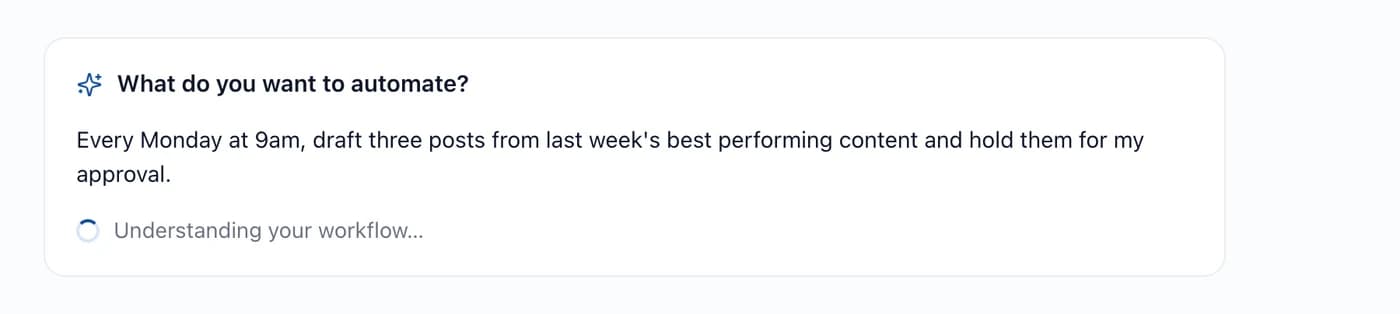
A good description has three parts: when it starts, what happens, and what you want at the end. The example above has all three, and that third one, *hold them for my approval*, is the part people forget.
Check what it understood
Before anything's created, Hyvo shows you the workflow it built so you can answer one question: did it understand what I meant?
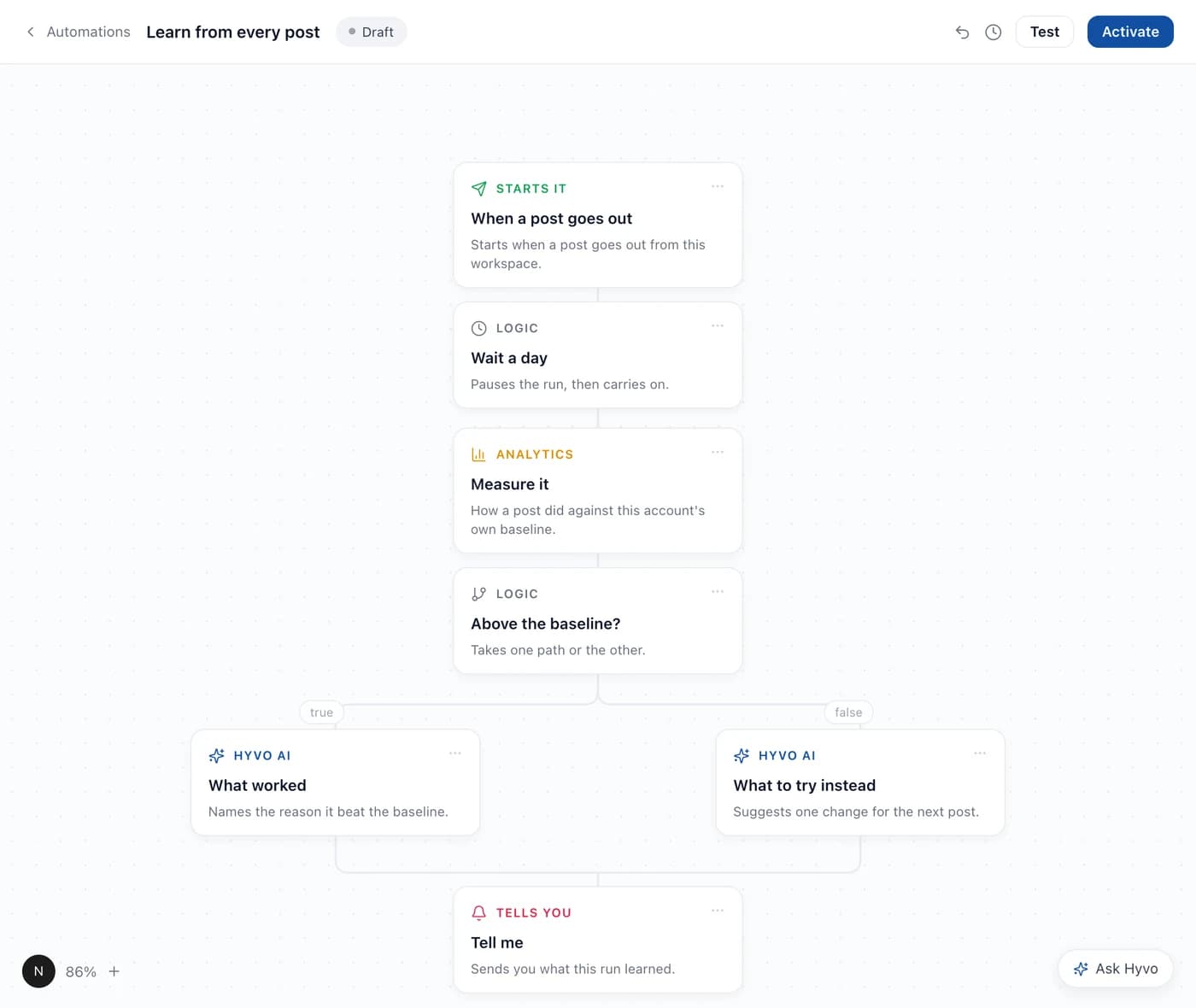
What to check:
- The trigger. Is it starting when you meant it to start?
- The order. Does anything publish before you'd want to see it?
- The branches. Does the condition split the way you expect, and does each side do something sensible?
- The ending. Does it tell you what happened?
Every step is editable afterwards, and a workflow starts as a Draft. It does nothing at all until you activate it.
Keep a human in the loop
Ask me first stops the run and waits for you. Nothing after it happens until you approve.
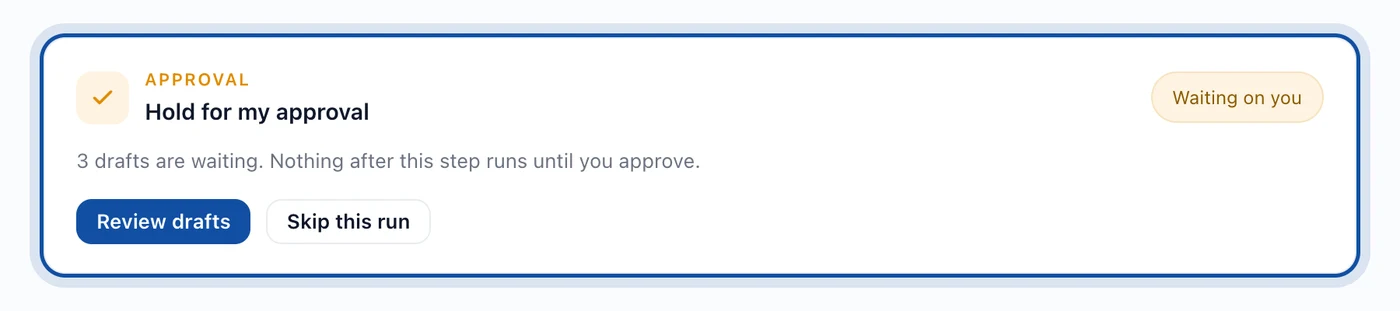
Put it before any publishing step until you've watched the automation produce good output several times running. The approval step costs you thirty seconds a week. Not having it costs you a bad post published under your name.
Watching the first runs
Each run records what happened, step by step, with a status:
| Status | Meaning |
|---|---|
| Succeeded | Everything ran |
| Partly done | Some steps ran, some didn't |
| Failed | A step stopped it |
| Waiting | Paused, usually on an approval |
| Running | In progress |
| Queued | Due to start |
| Skipped | A branch that wasn't taken |
A failed run names the step that failed and its error, so fixing it means opening that one step rather than rereading the whole workflow. The usual culprits are an expired social connection and a step pointed at an account that isn't connected any more.
Three workflows worth building first
- Monday drafts. On a schedule → find what works → write posts → ask me first. Turns the weekly planning session into a review session.
- Learn from every post. When a post is published → wait a day → get performance → if it beat the baseline, name what worked, otherwise suggest one change → tell me. Builds a record of what actually moves your numbers.
- Catch the timely thing. When Hyvo finds something → if relevant → find your angle → write it → ask me first. Keeps you in the conversation without watching a feed all day.
Where automations go wrong
- Automating publishing before you trust the drafts. Approval first, always. Take it out later if you want.
- One workflow that does everything. Several small ones are easier to debug and easier to switch off one at a time.
- Automating a decision. If the answer depends on judgement, the automation should surface it, not make it.
- Building it and never watching a run. The first three runs tell you whether the description matched what you meant.
A few limits
- A workflow has exactly one trigger.
- Automations come with Premium. On the free plan the section isn't available.
- Publishing steps need a live connection, so an expired account stops the run rather than queueing forever.
FAQs
Will automations post without me seeing anything?
Only if you build them that way. An Ask me first step before publishing holds every run until you approve it.
Can I edit a workflow Hyvo built for me?
Yes. Every step is editable, and the workflow stays a draft until you activate it.
What happens if a step fails halfway through?
The run gets marked Failed or Partly done and names the step and the error. Steps that already ran aren't undone.
How's this different from asking Hyvo AI to do the same job?
Agent does a job once, when you ask. An automation does it repeatedly, on a trigger, without being asked. See what Agent does differently.
Do I need to understand how workflows are built to use one?
No. Describing what you want in a sentence is the intended route; the canvas is there for when you want to change something.
About the author

Founder, Hyvo
Subarna Basnet is the founder of Hyvo, an AI-powered platform helping businesses create, manage, and automate social media marketing. He writes about AI, social media automation, content creation, and marketing technology.