How to Calculate Average Instagram Impressions (2026)
To calculate average impressions on Instagram, add up the views on your posts and divide by the number of posts. That one number tells you how often a typical post gets seen, and it's the first thing I check when I want to know whether an account is growing.
Why views? Instagram doesn't show impressions anymore. The app now shows views, and they do the same job. So whenever I say impressions in this guide, I mean views.
Here's what I'll cover:
- The formulas for average impressions per post, per day and per format
- A worked example with real numbers
- What a good number looks like for your account size
- The mistakes that make your numbers look better or worse than they are
A note on the numbers: I'm the founder of Hyvo, so the screenshots come from Hyvo's analytics, on a demo account for a made-up café, Bloom & Brew. The numbers are sample data. Use them to learn the math, not as a target.
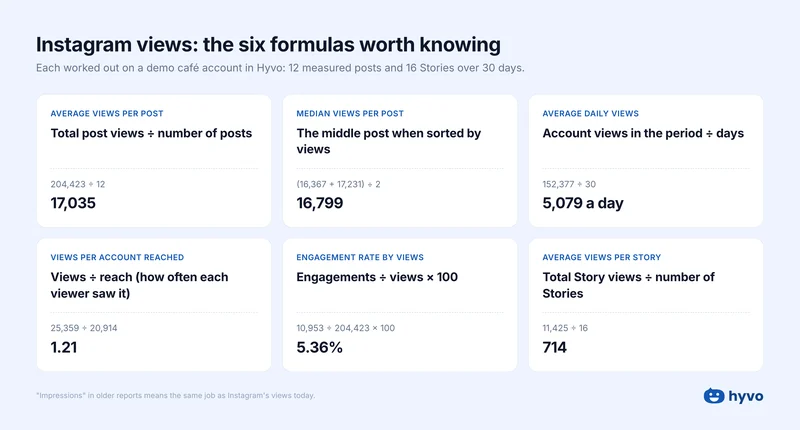
Average impressions formulas at a glance
| What you want to know | Formula |
|---|---|
| Average views per post | Total views ÷ number of posts |
| Average views per day | Your account's views ÷ number of days |
| Average views by format | Views for one format ÷ posts in that format |
| Views per person | Views ÷ reach |
| Engagement rate | Engagements ÷ views × 100 |
Does Instagram still show impressions?
No. Instagram replaced impressions with views between July 2024 and April 2025, and views are now the main number in the app (Social Media Today). A view counts every time your post appears on someone's screen, or every time a Reel starts playing. Replays count too.
Two rules I follow because of the switch:
- When someone asks me for impressions, I give them views. Many tools, Hyvo included, still label the column Impressions, but it's Instagram's views underneath.
- I never compare old impressions with new views. They're counted differently, so a jump or drop in 2024 or early 2025 may be the switch, not your content.
Impressions vs. reach vs. engagement
These three numbers answer different questions:
| Number | What it counts | What it tells you |
|---|---|---|
| Views (impressions) | Every time your post was seen | How much attention it got |
| Reach | Different people who saw it, once each | How far it spread |
| Engagement | Likes, comments, shares, saves and replies | Whether people cared |
If one follower sees your post three times and likes it once, that's three views, one person reached and one engagement. I divide views by reach to see how many times, on average, each person saw a post.
How to calculate average impressions on Instagram, step by step
- Pick a period. I use the last 30 days, and the same window every time.
- Find each post's views. In the Instagram app, open the post and tap View insights.
- Leave out posts from the last two days. Instagram can take up to 48 hours to finish counting.
- Add up the views and divide by the number of posts.
In the demo café account, 12 posts got 204,423 views in 30 days:
204,423 ÷ 12 = 17,035 average views per post.
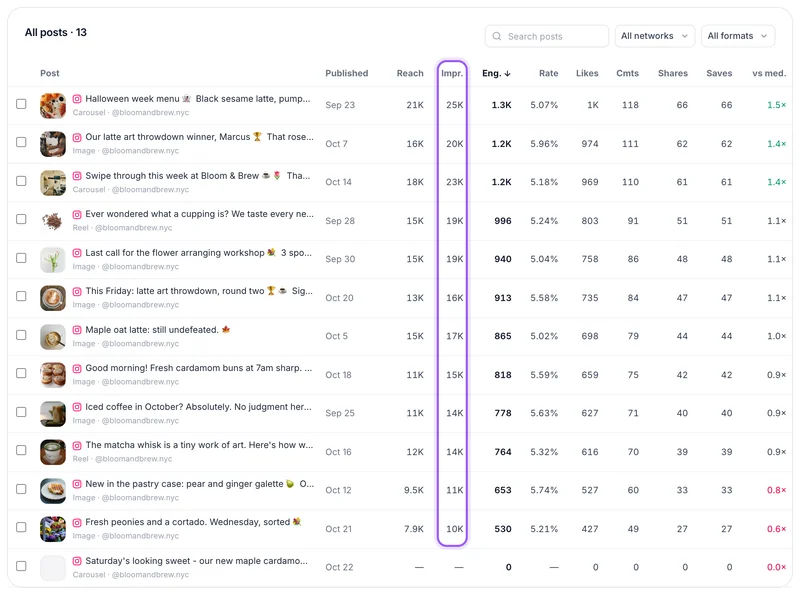
That newest post is why step 3 matters. If I'd counted it as zero, the average would have dropped to 15,725, and a normal month would have looked like a slump.
Once you have your average, it becomes your baseline. A post with 22,000 views beat this account's normal by about 30%, so I'd look at what it did differently.
Should you use the average or the median?
I check both. One viral post can drag the average way up, while the median (the middle post when you sort them by views) shows what a normal post gets.
For the demo café they're close: a 17,035 average and a 16,799 median. Real accounts are often far more lopsided. In Buzzabout's analysis of 245,559 Instagram posts, the average was about 26 times the median (Buzzabout). My rule of thumb: if your average is more than 25% above your median, plan around the median.
How to calculate average impressions by format
Reels, carousels, photos and Stories behave differently, so I average each one on its own: views for that format ÷ posts in that format.
| Format | Posts | Average views |
|---|---|---|
| Carousels | 2 | 24,273 |
| Reels | 2 | 16,672 |
| Photos | 8 | 15,317 |
| Stories | 16 | 714 |
Two carousels aren't enough to crown a winner, so I'd treat this as a reason to test more carousels, not a verdict. For Stories, save the numbers within 24 hours, because they disappear with the Story. Hyvo saves them for you.
How to calculate average daily impressions
For a daily average, I use the account's total views instead of adding up posts: account views ÷ number of days. The demo café had 152,377 views in 30 days, about 5,079 a day.
Don't worry if that doesn't match your post totals. Account views also include Stories, your profile and older posts people are still finding.
How to calculate engagement rate from impressions
Engagement rate = engagements ÷ views × 100. The demo café's posts got 10,953 engagements on 204,423 views, a 5.36% engagement rate.
Always say what you divided by, because it changes the answer. The café's best post, a Halloween carousel, scores 5.07% by views, 6.15% by reach and 10.32% by followers.
What's a good number of impressions on Instagram?
It depends on your follower count and what you post. Here are Socialinsider's 2026 averages, from about 67.5 million unpaid posts:
| Followers | Reels | Carousels | Photos |
|---|---|---|---|
| 1K to 5K | 580 | 993 | 417 |
| 5K to 10K | 1,000 | 2,117 | 1,068 |
| 10K to 50K | 2,460 | 4,275 | 2,340 |
| 50K to 100K | 6,095 | 11,597 | 7,405 |
| 100K to 1M | 16,035 | 35,370 | 22,900 |
Average views per post. Source: Socialinsider, February 2026.
Treat these as a rough guide, because a few viral posts push any average up. The best benchmark is your own median: I take the median views per post for the last 90 days and try to beat it next quarter.
One tip that helps: Adam Mosseri, the head of Instagram, says watch time, likes and sends (shares in DMs) matter most for ranking, and that sends count a little more with people who don't follow you yet (Social Media Today). So I aim for posts people want to send to a friend.
Your average impressions cheat sheet
Mistakes I see most often
- Counting brand-new posts. Leave out anything from the last two days.
- Adding up reach. The same person gets counted once per post. Adding up the demo café's post reach gives 165,869 people, but Instagram's count of different people reached in the last 28 days was about 35,600.
- Mixing formats. One average for Reels, carousels and Stories describes none of them.
- Mixing paid and unpaid posts. Boosted posts get extra views from ads, which inflates your normal average.
- Judging by views alone. More views can just mean the same people saw a post again. Check reach and engagement too.
Frequently asked questions
How do I calculate average impressions per post on Instagram?
Add up the views on every post from a set period, then divide by the number of posts. For example, 12 posts with 204,423 views between them average 17,035 views per post. Leave out posts from the last two days, because Instagram is still counting them.
Why are my Instagram impressions higher than my reach?
Views count every time your post is shown, while reach counts each person only once. If someone sees your post in their feed on Monday and on your profile on Thursday, that's two views but one person reached.
Do Reel replays count as views on Instagram?
Yes. Every replay counts as another view, which is one reason a Reel's views can be much higher than its reach.
How do I find average views for Instagram Stories?
Divide your total Story views by the number of Stories you posted. Story numbers disappear after 24 hours, so write them down while the Story is live, or use a tool like Hyvo that saves them for you.
Why don't my old Instagram impressions match my new views?
They're different metrics, counted in different ways, and Instagram hasn't published a way to convert one into the other. Compare views with views, and treat July 2024 to April 2025 as a break in your data.
My final recommendation
You don't need a complicated report. Once a month, I'd do three things:
- To see if you're growing: track your median views per post, month to month.
- To see which format works: compare average views per Reel, carousel and photo.
- To report to a client or your boss: share views, reach and engagement rate, and say what you divided by.
If you'd rather skip the math, Hyvo's analytics does it for you: views, reach and engagement for every post, the median per post, results by format, and Stories saved before they disappear. Then Hyvo AI can turn what worked into your next post. Try Hyvo free. No credit card needed.
More from the blog

Social Media Management
Best X (Formerly Twitter) Scheduling Tools 2027: 12 Top Picks
Stop guessing. Post with Hyvo.
Plan, write and publish to every platform in one place. Hyvo learns from your results and shows you what to post next.
Hyvo’s integrations with platforms you love
Free plan, no credit card needed